Creating Graphical Applications with Tcl/Tk
Making The Process Easier

Creating a full-featured graphical application from the ground-up has always been a daunting task, even for accomplished developers. Coding a GUI involves substantial effort dealing with window managers, geometry managers and the event loop in order to build even a very simple form that collects some basic user input.
Adding a few forms to an application might require many tens or even hundreds of calls to one or more geometry managers in order to render the various graphical widgets when a form is displayed on screen. This program code is wholly orthogonal to the application’s program logic, and combining the two aspects into a single script can result in a disorganized and unmaintainable program script.
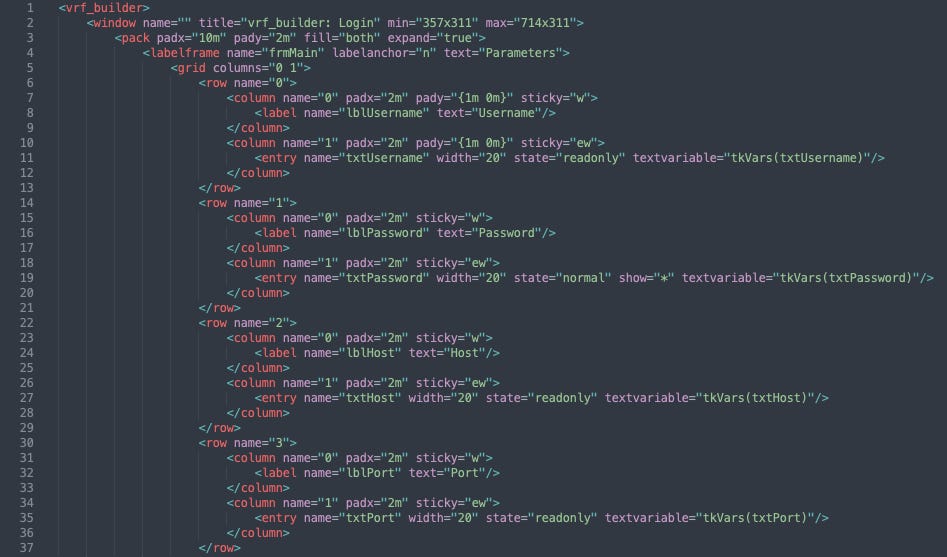
The Objective Tk system is an abstraction for the Tk graphical toolkit which allows all of the code pertaining to an application’s GUI to be sidelined into an XML file. It is designed to work with TclOO (Object-Oriented Tcl) such that Forms are created from a class definition. In order to display a Form on-screen, an object is created from the Forms class definition and then the Build method, supplied by the Objective Tk class, is called. This causes the XML file to be consulted for the specific Form that is to be rendered on screen and all of the code required to create the form is built and executed on-the-fly. All of the code snippets that will be processed by the Event Loop can also be stored in the XML file and will be incorporated into the app in real-time.
The application’s main program script can thus be stripped of all of the repetitive GUI code that would otherwise distract from the main program logic.
How Does Objective Tk Work?
An XML file is created which contains all of the necessary information to render forms on screen, and to activate the widgets so that they respond to user actions. This XML file must comply fully with published standards for XML; errors will result from any deviation.
Widget Ancestry
An entire application can be stored in a single XML file with each form as an element node nested within the application’s parent node. Every widget on a form is in turn represented as an element node nested within the parent form’s node. Widget ancestry is also applied by nesting one element representing a widget inside a parent element that represents a container (frame, paned window or tabbed notebook). Multiple containers can be stacked on inside another in this way.
Widget Naming
Every widget will have at least one property; a label that is unique within the scope of the form on which it appears. When the form is built, the fully-qualified name for each widget will be intuited from the XML hierarchy, and the result stored in a variable whose name corresponds to the name attribute applied to each specific widget.
Widget Properties
Some widgets such as a simple unlabelled frame will not require any other properties beyond a name. All other widgets will require more XML attributes which are named precisely the same as the Tk property that is to be set. For instance, a labelled frame will require two more attributes called labelanchor and text so that the label is displayed and positioned correctly.
Widget Placement
Objective Tk fully supports both of the two geometry managers called grid and pack. The former is used to divide the parent container into a grid of cells that can then be filled with widgets. The latter is used to fill one or more specified edges of the container with the child widget.
Within the XML markup, the element node for each widget is enclosed by parent element nodes that specify which geometry manager is to be used, and attributes associated with the parent geometry element are used to pass instructions regarding placement of the widget.
The precise response of widgets to a window resizing event can also be controlled through Objective Tk
The Event Loop
The XML markup supports an element named bind which is used to store the event loop code for each specified event associated with a particular widget. The program code is stored as text content of each of the bind elements and the event for which the code should be executed is stored as an attribute of the bind element called name
Objective Tk allows the shortcut references that expand into fully qualified widget names to be used in these event loop code snippets. There is no need to write out the long name by hand.
Why Is Objective Tk Useful?
Automatic Widget Naming
Every form built with Objective Tk comes with a set of variables, one for each widget, which store the fully-qualified names of their assigned widget. Each of these variables is named using the widget’s label that was specified using the name attribute in the XML file.
This is a valuable feature because forms often require stacked frames or containers to achieve the required on-screen appearance. The name of each widget will incorporate every ancestor container widget which can result in a long string. Without the help of Objective Tk, the fully-qualified name for every widget will have to be manually typed out in the main script. This is ugly and can often be written incorrectly, leading to errors.
These widget name variables are part of the form object’s private data, and as such can only be accessed from other objects if an accessor method is created for that purpose.
Easy Navigation of the GUI Markup Code
The GUI is described using markup code written in XML. Quickly locating a specific widget for making adjustments or additions is very straightforward using your preferred editor.
Compatible With Object Oriented Tcl
The Objective Tk system is designed to work with the object-oriented features that are built into Tcl. Each form is a separate object that inherits from a class definition. The Objective Tk features can be added to that class definition as a Mix-In class and each form will then acquire a Build method that is called to render the form on screen.
Event Loop Code Snippets
Every widget requires at least one item of code that is bound to an event associated with that widget. For instance, if a button is clicked by the user, then the associated code snippet should be executed. Multiple events associated with the same widget may require code bindings, and these will accumulate in the script as annoying cruft that distracts from the core logic of the application. The Objective Tk system neatly curtails all of these little chunks of code into the XML markup file where they can be maintained without creating the scattergun annoyances in the main program script.
As an added bonus, the shortcut widget name variables can also be used in these event loop snippets and the long-form names do not have to be written out, just as with the code for the form object in the main script.
Who Would Benefit from Objective Tk?
Rapidly develop GUI standalone applications to frontend a database or networking equipment such as testers or routers.
The developer has used the Objective Tk system to build a relational database system that generates Juniper router configurations for turnkey installation. The screen captures on this site are from this application.
Show Me Some Forms!
Sophisticated cross-platform Graphical Applications that are themed by the operating system are a snap to build using Objective Tk.
Here are some examples from an application that the author created to generate router configurations from data stored in a relational database.
A Login Dialog
The first window that your application will probably want to display will be a little login dialog that collects some basic input from the user such as their username and password and then forms a network connection to the remote database server.
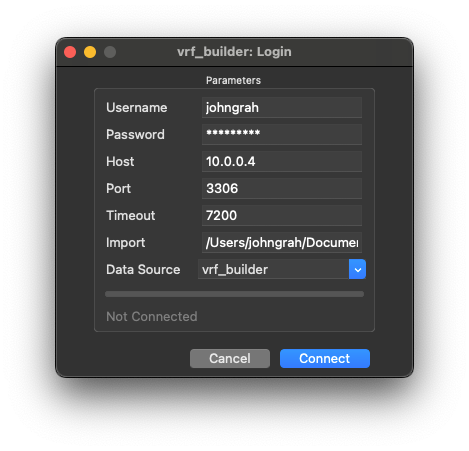
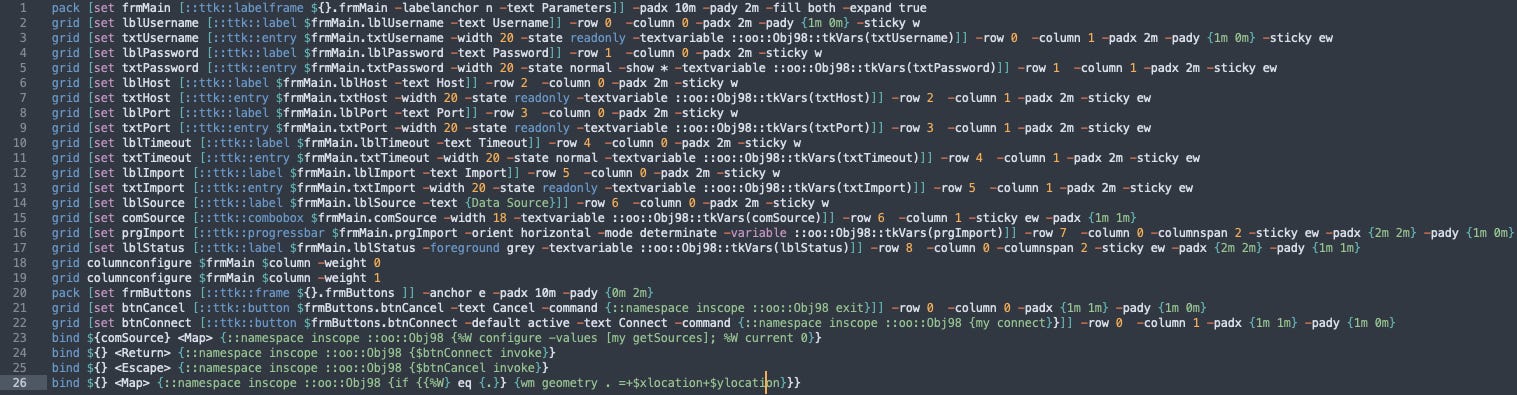
Deceptively simple, this little form requires 26 lines of highly-condensed Tcl code that looks like this…
A better solution is to allow Objective Tk to generate all of those lines of code on-the-fly. Here is part of the XML markup that is used to create our Login dialog…